






Retail WSSI (Weekly Stock Sell-Through and Inventory) planning breaks in Excel once you’re managing thousands of SKUs across stores and ecom. The issue isn’t that Excel can’t calculate WSSI, it’s that spreadsheets can’t keep WSSI inputs accurate, current, and consistent across teams, which leads directly to stock imbalances and delayed decisions. That’s why many retailers replace spreadsheets with Fashion Merchandising Software built for governed, in-season planning.
If your weekly WSSI update depends on manual POS/ERP exports, fragile formulas, and multiple file versions, the plan is already out of date by the time it’s shared. Modern WSSI requires a system that refreshes data automatically, enforces one version of truth, and supports collaborative, auditable planning capabilities that purpose-built merchandising software delivers far more reliably than a spreadsheet.
What is WSSI planning and which decisions it drives in retail
WSSI is the weekly operating plan that ties sales, inventory, receipts, and markdowns into one view so teams can control availability and margin in-season. It is the working mechanism behind weekly trade decisions in fashion retail, not a retrospective report.
WSSI keeps day-to-day merchandising decisions aligned because it forces sales, stock, and intake to reconcile every week. When the plan is current, teams can act on allocation, replenishment, and markdown timing before the week is lost.
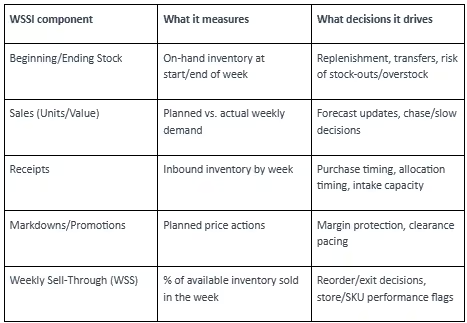
WSSI components explained stock sales receipts markdowns and weekly sell-through
Core components of a WSSI plan (what each line controls)
How WSSI connects to allocation replenishment and markdown timing
WSSI isn’t just a finance view, it’s what keeps day-to-day merchandising decisions aligned. Once you’ve got weekly sales and stock moving together, you can act faster on the levers that actually change outcomes:
- Allocation and reallocation: When sales velocity shifts, WSSI highlights where inventory is too heavy or too light, so you can move units before the week is lost.
- Replenishment: Beginning and ending stock by week makes it clear where you’re heading into stock-out risk, especially on core sizes.
- Receipts timing: Planned receipts tell you whether inbound inventory supports the sales plan, or whether intake is arriving too late to matter.
- Markdown timing: Markdowns and promotions sit inside the same weekly view, so clearance pacing doesn’t accidentally blow up margin or leave you with aged stock.
In a fast-moving fashion season, those calls can’t wait for a monthly review. They happen week by week.
Common WSSI KPIs and what good looks like by week
WSSI works because it forces a consistent weekly rhythm. The KPIs are simple, but the discipline is in keeping them current and comparable across channels:
- Beginning stock and ending stock: Shows whether inventory is building or draining versus plan.
- Sales (units and value): Tracks planned vs actual demand, and flags where the forecast needs a reset.
- Receipts: Confirms what’s actually landing, not what was expected to land.
- Markdowns/promotions: Keeps price actions tied to inventory position, not gut feel.
- Weekly sell-through (WSS): A fast read on whether a SKU, size run, or store cluster is performing or stalling.
Why does Excel break for WSSI at scale across SKUs channels and teams
Excel breaks for WSSI because it cannot maintain one live, governed plan while sales, inventory, and receipts change across stores and ecom. The predictable result is that planners spend the week reconciling files instead of running the business.
Where manual data integration and version control create planning risk
WSSI in Excel usually starts with good intent, then turns into a weekly scramble.
Manual integration is the first crack:
- Data gets pulled from POS systems, ERPs, and warehouses, then formatted and imported.
- Every handoff is a chance to introduce errors, delays, or mismatched definitions.
Version control is the second:
- Multiple versions of truth: Store, ecom, and warehouse views often live in separate files, so teams plan against different numbers.
- File-based collaboration is slow: Emailing or sharing spreadsheets creates delays, conflicts, and access risk.
- No audit trail: Spreadsheets don’t provide time-stamped change history by user, which makes sign-off and accountability difficult.
How formula errors and file complexity distort forecasts and open-to-buy
Excel is a calculation engine. That’s also the trap.
WSSI models get complex fast, especially in fashion merchandising where you’re balancing depth, size curves, and store profiles across weeks. In practice, that leads to:
- Broken links and fragile formulas: A single range shift or overwritten cell can push incorrect receipts, sales, or stock projections across the plan.
- Risk of formula errors: Nested formulas are hard to validate, and one wrong parenthesis can create forecasting mistakes that ripple into inventory and sales.
- Complexity and scale limits: With thousands of SKUs, multiple channels, and different store profiles, WSSI workbooks get heavy, slow, and crash-prone.
Open-to-Buy (OTB) is where the damage shows up. If the sales plan or receipts plan is off, OTB gets recalculated on bad inputs, and buying decisions drift away from what demand is actually doing.
Why lack of real-time visibility causes stockouts overstock and margin loss
Excel gives you a snapshot. WSSI needs motion.
Without dynamic visibility, inventory decisions get made on old information:
- Fast sellers don’t get chased in time, so stock-outs hit while demand is still there.
- Slow sellers keep receiving, so overstock builds and markdown pressure rises.
- Allocation stays broad because the file can’t stay responsive at SKU, size, store level.
If any of these are true, Excel is already limiting WSSI outcomes:
- Weekly WSSI updates require manual exports/imports from POS/ERP/WMS
- Planners spend time fixing links/formulas instead of reviewing exceptions
- Teams debate “which file is correct” in trade or WBR meetings
- Store/ecom allocation decisions are made on last week’s snapshot
How do you choose WSSI planning software to replace Excel without disrupting operations
Dedicated WSSI planning software replaces spreadsheet reconciliation with automated refresh, governed metrics, and controlled collaboration. The outcome is simple: faster weekly re-forecasting, fewer allocation mistakes, and cleaner accountability because everyone works from the same plan.
Must-have capabilities integrations automation audit trails and collaboration
A WSSI tool either runs the weekly cadence, or it becomes another system you export from. Non-negotiables look like this:
- Create one source of truth: Centralize sales, inventory, receipts, and markdown plans with governed definitions.
- Update plans as data changes: Refresh WSSI inputs often enough to support in-season decisions, not just weekly reporting.
- Support SKU–size–store planning: Handle granular hierarchies without workbook performance limits.
- Enable collaboration with control: Role-based access, approvals, and a time-stamped audit trail.
Introducing Increff: AI-powered WSSI/MSSI planning software
Increff is a retail planning platform that digitizes WSSI/MSSI workflows so planners, buyers, and finance teams can work in one governed system instead of multiple spreadsheets.
Key capabilities (and the planning problem each one removes):
- Comprehensive data integration: Consolidates inventory, receipts, and in-season sales so WSSI updates don’t depend on manual exports.
- Adaptive Open-to-Buy (OTB): Recalculates buying budgets against actuals so commitments track demand, not outdated plans.
- Interactive planning dashboards: Replaces emailed files with shared views for planners and buyers, with controlled access.
- Granular BI for retail: Filters performance by brand/segment/channel to surface exceptions that require action.
- Smart hierarchy roll-ups: Pushes plan changes up/down the product hierarchy so totals and details stay consistent.
Inventory turns increase by up to 18% and stock-outs decrease by up to 22% when teams move from spreadsheet WSSI to advanced planning software.
Which evaluation criteria matter most for fashion and apparel WSSI
The criteria that matter most are the ones that protect in-season speed and accuracy at SKU depth. For fashion and apparel, the tool must stay granular, current, and usable under weekly trade pressure.
Granularity that holds up: Can the system plan at SKU, size, store level without collapsing into averages?
Forecasting that adapts: Does it re-forecast when sales velocity changes mid-week, or does it rely on static logic and manual overrides?
Allocation support: Can it drive dynamic inventory allocation and replenishment decisions using the latest sales and inventory signals?
Scenario planning: Can you model “what if we pull forward the markdown?” or “what if the receipt is late?”
Actionable BI for retail: Does it surface exceptions and alerts, not just totals and averages?
Conclusion
Excel can calculate WSSI, but it cannot run WSSI reliably at scale when inputs change daily and multiple teams need to act on the same plan. Retailers that move WSSI into dedicated planning software reduce version conflicts, shorten weekly update cycles, and make allocation and markdown decisions on current data, not last week’s snapshot.
For fashion teams, the shift is less about “new tools” and more about operational control: one governed dataset, one cadence, and one accountable workflow. That’s the practical value of Fashion Merchandising Software when weekly trade decisions have real margin impact.