






Retail merchandising is the system retailers use to decide what to sell, where to place it, how much to stock, and when to replenish so customers find winners in-stock without creating costly overstock. In multi-location retail, merchandising performance shows up in three numbers: in-stock rate, sell-through, and inventory turns.
If you’re evaluating retail merchandising software, this guide shows what it replaces (spreadsheet replenishment and disconnected planning) and what it improves (availability, margin, and execution) within the first few weeks of rollout. You’ll also see where merchandise planning software and merchandising software fit into the same operating system, so planning decisions reach the shelf.
Want to see this in action for your stores? Request a demo and walk through a real replenishment and assortment workflow.
What retail merchandising includes (quick map)
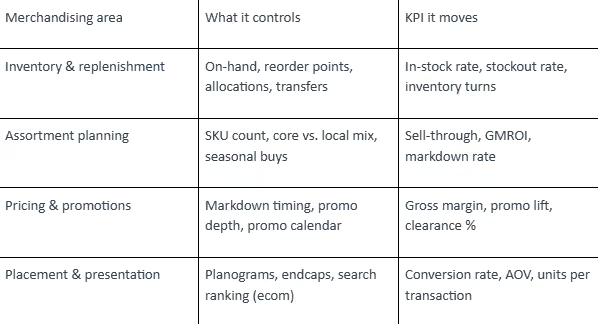
What is retail merchandising and what core pillars drive sales and customer experience
Retail merchandising turns demand into a repeatable store experience: the right products, in the right place, at the right time, with the right stock depth. Done well, it keeps customers from walking out empty-handed and keeps your backroom from filling with slow movers.
Retail merchandising definition and goals
Retail merchandising goes beyond “filling shelves.” It’s the operating system that shapes the shopping journey and the business results behind it.
The goals stay consistent across formats:
- Keep winners available (protect in-stock rate and sales)
- Avoid excess inventory that forces clearance (protect margin)
- Make shopping easy, so customers buy more than they planned (lift conversion and basket size)
- Run the work without burning the team out (reduce manual reporting and spreadsheet replenishment)
That’s why teams move from manual processes to retail merchandising software. The work has to scale across stores, seasons, and local demand. Best results come when planning and execution share the same data model (sales, inventory, lead times, and store attributes) instead of living in separate files.
The four merchandising pillars and how they connect
Retail merchandising usually breaks into four connected pillars. Each one feeds the next, so gaps show up fast.
- Inventory and replenishment: what’s on-hand, what’s on-order, and what needs to move between locations
- Assortment planning: which SKUs belong in the business, and how deep to buy by store or cluster
- Selling strategy (placement, presentation, and attachments): how items are displayed, bundled, and promoted to convert
- Operations: reporting, workflows, and the routines that keep the system running
If assortment is off, replenishment refills the wrong items. If inventory accuracy is off, even the best plan turns into phantom stockouts. If operations are manual, the team spends nights in spreadsheets instead of fixing issues.
Retail merchandising KPIs to track and improve
You don’t need 40 metrics. You need a small set that tells you what’s selling, what’s stuck, and what’s at risk.
Common KPIs retail teams track inside merchandising software or retail merchandising software include:
- In-stock rate and stockout rate (by store and SKU)
- Sell-through (especially by week in-season)
- Inventory turns and turnover rate
- On-hand vs. on-order visibility (to prevent gaps and duplicates)
- Weeks of supply (to spot overstock early)
- Gross margin and markdown exposure (what’s likely to be discounted)
- Conversion rate, AOV, and units per transaction (when placement and attachments are in play)
If you’re tracking these in spreadsheets, the next step is making them operational so the numbers trigger actions, not just reports. For KPI definitions and standard retail formulas, the National Retail Federation’s glossary is a solid reference: NRF retail metrics and definitions.
How does merchandising management software improve inventory accuracy replenishment and markdown decisions
Merchandising management platforms improve inventory performance by combining POS sales, on-hand stock, and lead times to generate reorder recommendations by SKU and store. That’s the difference between “we think we’re low” and “this SKU hits its minimum tomorrow, place the PO today.”
This is where retail merchandising software and merchandise planning software earn their keep: fewer stockouts on winners, fewer overstock piles, and fewer late-night fixes. Retailers that operationalize these workflows also reduce manual touches per SKU, lowering labor cost per store.
How POS and inventory integrations create real time visibility
Real-time visibility comes from connecting POS transactions, inventory ledgers, receipts, transfers, and adjustments into one view. When those feeds reconcile daily, you can trust on-hand and act on it.
Modern merchandising software reduces manual stock checks by connecting directly to your POS. That connection gives you visibility into:
- What’s in hand by store and SKU
- What’s selling right now (not last week)
- What’s aging out or past its prime
- What’s moving between locations (transfers) and what’s being corrected (adjustments)
Your best-selling sneakers drop to a preset threshold. The system flags it immediately, while there’s still time to act.
The same visibility protects you from overstock. A warehouse stuffed with last season’s jackets ties up cash and space. When weeks of supply climbs beyond what the season can absorb, you see the risk early.
For a practical overview of how POS data is used in retail analytics and replenishment, see Shopify’s explainer on POS reporting and inventory insights.
How do reorder points alerts and automated purchase orders reduce stockouts
Reorder points and automated POs reduce stockouts by turning inventory thresholds into timely orders that account for lead time and order cadence. Instead of reacting after a shelf is empty, you place the order while there’s still selling time left.
With retail merchandising software, you set reorder points for your hottest SKUs, then the system raises alerts and can place purchase orders automatically based on the rules you’ve defined. That means orders get placed faster, instead of losing sales momentum.
A practical setup usually includes:
- Reorder points (min/max or days-of-supply targets) by SKU and store
- Order cycles that match how often you want to buy or transfer
- Lead times, so the system recommends orders early enough to land before you stock out
- Approval workflows, so the team stays in control without doing everything manually
Markdown decisions fit here too. When slow movers stack up, the system flags them so you can act before discounts get steep. The first markdown is usually the cheapest; delaying action compresses the selling window and forces deeper discounts later.
How do exception based workflows prevent stockouts and overstock at scale
Exception-based workflows prevent stockouts and overstock by focusing the team on the small percentage of SKUs breaching thresholds today. That’s how high-SKU retailers scale without adding headcount.
Great retail merchandising keeps high-velocity SKUs in stock while preventing slow movers from consuming cash and space. The fastest way to do that at scale is POS-connected inventory visibility plus automated reorder rules.
What to implement (in order):
- Real-time inventory accuracy by store and SKU (POS + receipts + transfers + adjustments)
- Reorder points and order cycles per SKU/store (min/max or days-of-supply targets)
- Exception-based replenishment (only review items that breach thresholds)
- Early markdown signals for slow movers (weeks-of-supply and sell-through triggers)
Snippet-ready: common triggers retailers automate
- Reorder when on-hand + on-order drops below a set minimum
- Flag overstock when weeks of supply exceeds a threshold for the season/category
- Trigger markdown review when sell-through lags plan by a defined % by week
Instead of reviewing every SKU, your team reviews the exceptions: items about to stock out, categories drifting into overstock, and products not moving by week three of the season. Exception alerts also surface pricing errors, phantom inventory, and misallocated stock before they become lost sales or forced markdowns.
Midway check: if you’re evaluating tools, Increff’s [Allocation & Replenishment](https://www.increff.com/solution/allocation-and-replenishment) is built for this kind of exception-led workflow across stores. Increff is a retail operations platform that connects POS demand to allocation, replenishment, and execution so store teams act on one source of truth.
How do demand planning and assortment optimization help you stock the right products at the right time
Demand planning and assortment optimization help you stock the right products by translating sales history and seasonality into store-level SKU and depth decisions. The output is a buy and replenishment plan that matches local demand instead of averages.
Assortment planning becomes repeatable when the team uses the same inputs—sales history, seasonality, and store clusters—to set SKU counts and depth targets. When planning and replenishment share the same assumptions, you avoid the classic failure mode: a great plan that never makes it to the shelf.
What data improves demand forecasts seasonality events and trends
The data that improves demand forecasts includes clean sales history, in-stock signals, seasonality curves, event calendars, and lead times. Forecast accuracy improves when you separate true demand from lost sales caused by stockouts.
Demand planning tools use past sales data, seasonal patterns, and signals like holidays and local events to produce forecasts that guide buys and replenishment timing. The goal is to order earlier, with more confidence, using the same inputs every time.
When demand for swimsuits spikes as the days heat up, the system pushes orders before the season peaks.
For a widely used baseline on forecasting concepts (including seasonality and trend), see the APICS/ASCM overview of demand planning fundamentals.
How do you build an assortment plan by store cluster and customer segment
You build an assortment plan by clustering stores with similar demand, defining a core assortment, and then localizing the remaining space based on customer segment and selling patterns. The goal is fewer duplicated SKUs and more depth in proven winners.
Merchandising and assortment planning prevent two common customer reactions:
- Overwhelm from too many options
- Frustration when the item they need isn’t there
A repeatable assortment plan usually includes:
- Core vs. local rules, a core set of SKUs carried everywhere, then localized items by store cluster
- SKU rationalization, removing duplicative items that split demand and create dead stock
- Newness planning, scheduling introductions and exits so the floor stays fresh without bloating inventory
Placement by location is part of the same discipline. A shop by the shore sells more shades and flip-flops, while its uptown sibling earns more from smart briefs and planner cases. Merchandise planning software helps you adjust selection to the mix of people walking through each door, so each store feels like a custom version of your brand.
For a practical framework on SKU rationalization and assortment breadth, McKinsey’s retail insights are a useful benchmark: McKinsey on assortment and retail operations.
How do you use sell through and markdown timing to protect margin
You protect margin by monitoring sell-through against plan weekly and acting early on slow movers with targeted markdowns, transfers, or promotion changes. Early intervention reduces discount depth.
Key actions:
- Placement that drives conversion: put high-margin or high-conversion items at eye level or in high-traffic zones, including near the register
- Attachments that grow baskets: make high-probability add-ons visible at the moment of purchase
- Cross-sell and upsell based on basket data: use purchase histories to find pairings that make sense
A shopper checks out with a tablet, and the system nudges the case, the screen protector, and the service plan as add-ons.
Seasonal promotions get sharper when demand planning and merchandising execution work together. Black Friday, back-to-school, holiday shopping, Valentine’s Day—these moments punish late planning. Demand planning tools flag trending items weeks in advance, so you can build displays that connect with shoppers and avoid bare shelves.
E-commerce fits the same logic. Merchandising management tools analyze customer behavior and suggest product placements, complementary items, and search ranking changes. The goal is one shopping journey across online and physical locations, so the experience stays consistent and the average basket size keeps climbing.
Conclusion
Retail merchandising is a repeatable operating system: forecast demand, set the assortment, place inventory where it will sell, and replenish automatically based on real sales. Teams that standardize these steps reduce stockouts on winners, cut markdown exposure on slow movers, and spend less time in spreadsheets.
Request a demo and see how retail merchandising software, merchandise planning software, and merchandising software fit into your day-to-day workflows.